Restaurant Table Bookings PRO
Take full control of guest reservations and turn your WordPress site into your restaurant's digital command center. Complete with a touch-native Staff POS Terminal for counter tablets, live room occupancy map, smart auto-approval engine, and automatic calendar sync to eliminate no-shows.
From manual chaos to total control
Stop losing valuable guests and hours of staff focus with paper reservation books and phone interruptions during dinner service.
Traditional paper and telephone bookings
Phone calls constantly interrupt front-of-house staff during peak rushes, causing greeting delays and stress. Paper logbooks lead to double bookings and messy handwriting, while missing calendar reminders drive no-show rates higher without capturing customer history.
With Restaurant Table Bookings PRO
Capture online reservations 24/7 automatically, even when your venue is closed. Standard smartphone calendar invites (.ics) keep guests reminded, while your staff uses a touch-optimized POS terminal with real-time floor occupancy to seat walk-ins in seconds.
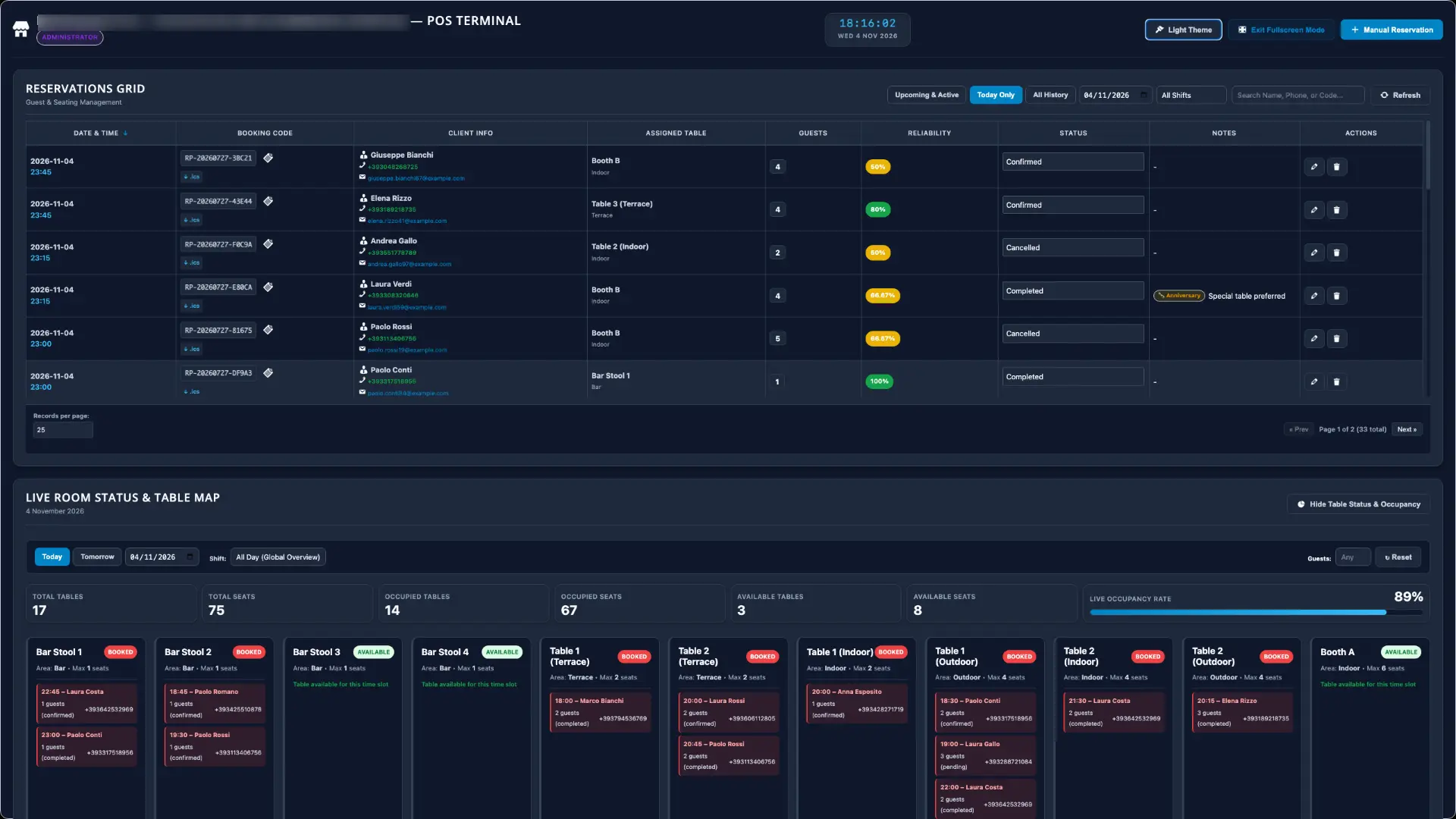
Hospitality front desk on any counter tablet
A native touchscreen web application engineered specifically for counter tablets (iPad, Android) and touch monitors. Front-of-house staff can seat walk-in guests and enter phone reservations in under 3 seconds.
Features a real-time digital clock, rapid shift filters (Lunch / Dinner), 1-tap Dark Mode OLED toggle for dimmed dining rooms, and quick 1-tap phone dialing for late guests.
Live floor map & real-time room occupancy
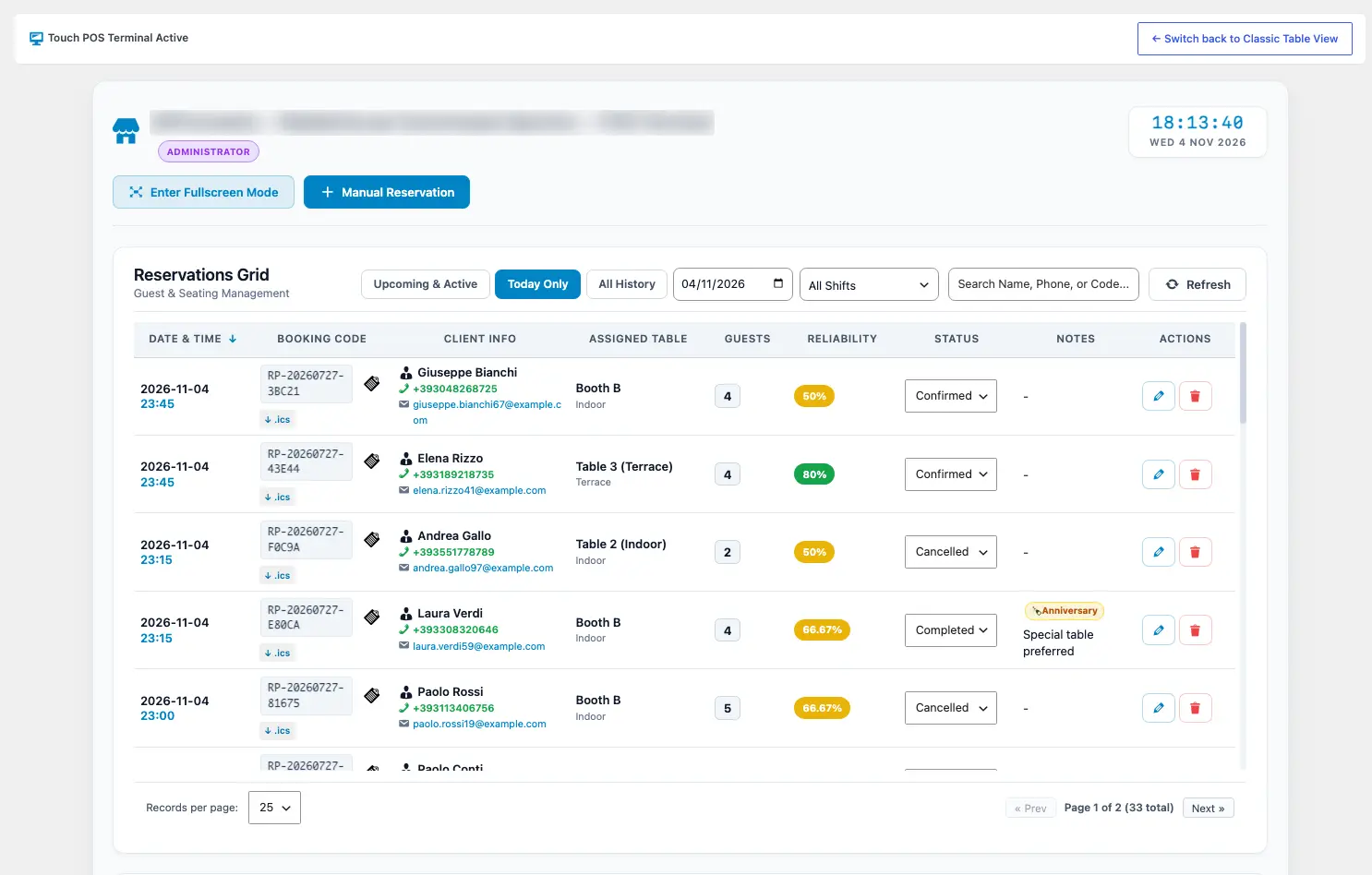
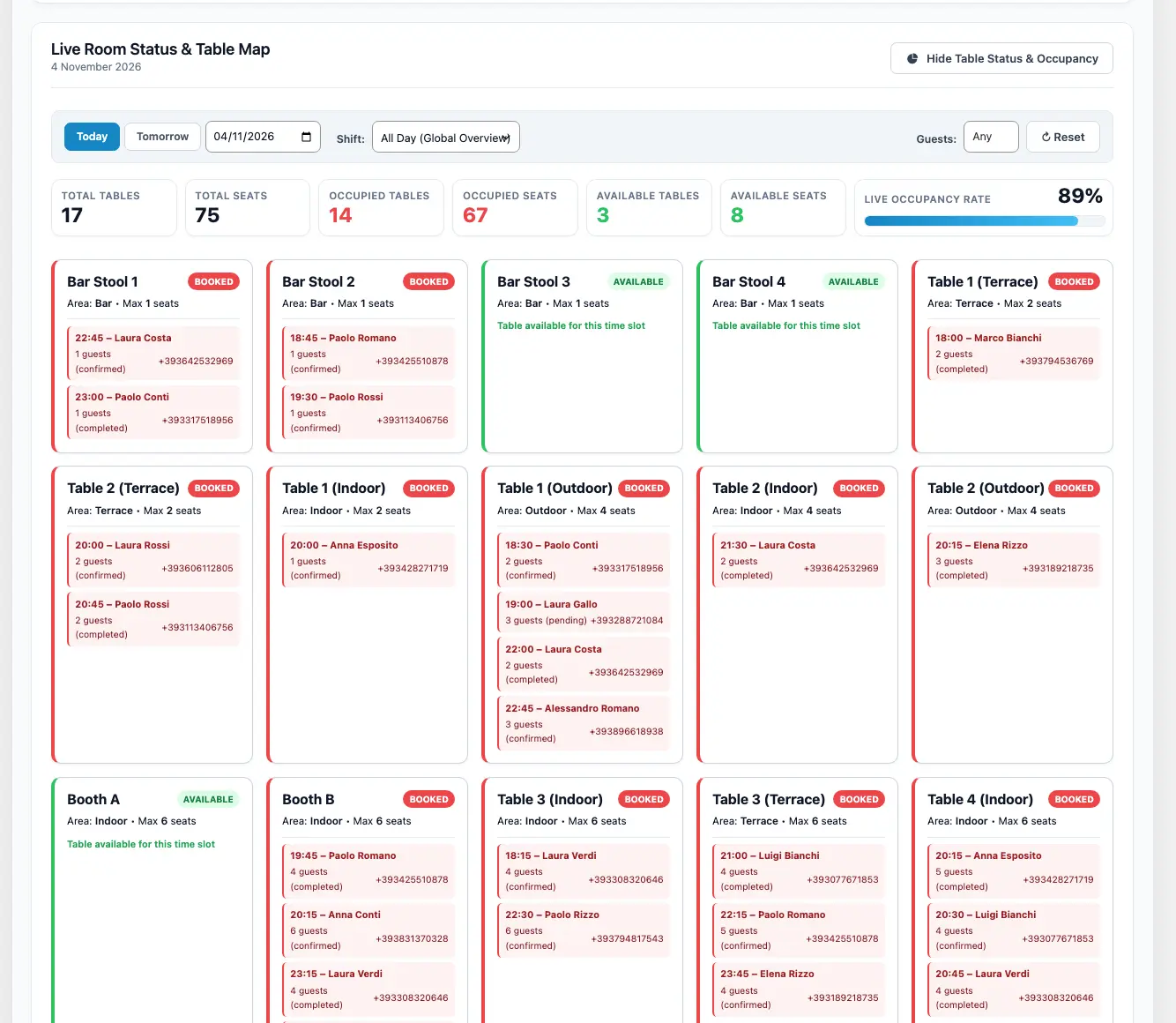
Keep a real-time pulse on your dining rooms: view the live KPI bar displaying Total Bookings, Seated Guests, Available Tables, and instantaneous Occupancy %.
Every table is rendered as an interactive visual card with clear color coding: verify availability, seat counts, party constraints, and allocate covers without double-booking risk.
Features included in the core edition
Everything you need to immediately start accepting direct online table reservations on your WordPress site with zero recurring commissions.
Frictionless multi-step wizard
A smooth 4-step booking flow for guests: choose party size, date and shift, select dining room area, live capacity check, and instant contact confirmation via shortcode [ln_restaurant_booking_form].
Modern Cards & Classic Bistro
Two distinct built-in responsive themes: Modern Cards for high-tech cafes and cocktail lounges, and Classic Bistro with warm ivory tones for trattorias, pubs, and wine bars.
Flexible shifts & past slot blocking
Configure separate lunch and dinner shifts, seating duration, and turnaround intervals. The form automatically detects and disables slots already past the current wall-clock time on today's date.
Worldwide phone prefix auto-detection
Interactive country code dropdown with flag icons that automatically selects the user's country code based on browser locale or IP, backed by RFC 5322 & ITU-T E.164 verification.
Dietary quick tags & [ Tag ] badges
Guests can tap interactive quick tags for the kitchen (⚠️ Allergy, 🌾 Gluten Free, 🥕 Vegan, 👶 High Chair, 🎂 Birthday). Any words enclosed in square brackets render as prominent visual badges.
HTML emails with 1-click restore
Automatic confirmation and modification notices for guests, plus instant alerts for venue management. Includes responsive HTML templates with live preview modals and an instant Undo/Restore button.
Admin reservations grid with auto-save
Full-featured management table with date, shift, and status filters (All, Confirmed, Pending, Completed, Cancelled, No-Show), live search, and instant AJAX status updates with animated saved badges.
GDPR compliance & demo data installer
Mandatory privacy consent checkbox with custom legal disclaimer text. Includes a 10-second demo data installer to quickly generate realistic tables, client CRM entries, and sample reservations.
Zero-loss database guarantee
The free core and PRO edition share the exact same underlying database schema: upgrading preserves all your tables, reservations, and customer records 100% without reconfiguration.
Superpowers unlocked with the pro edition
Designed specifically for fast-paced dining rooms, reception host desks, and high-volume hospitality management.
Staff POS Terminal for tablets
Native touch web application for counter iPads and Android tablets with shortcode [restopub_staff_terminal]. Allows 3-second rapid walk-in and phone reservation insertion.
Light & Dark OLED Theme Switcher
1-Tap instant toggle between a crisp high-contrast Light Theme and a glare-free Dark Mode OLED theme, ideal for low-light evening dinner service and conserving tablet battery life.
Live room occupancy map & KPI bar
Monitor seated parties, available tables, and real-time room occupancy percentage with interactive color-coded floor cards displaying table capacity and booking details.
Smart auto-approval automation engine
Eliminate manual review bottlenecks without risking costly no-shows: loyal VIP patrons with proven reliability scores are confirmed instantly, routing risky guests to manual staff review.
Dark Mode Luxe & Sidebar Split themes
Two luxury themes for the customer booking wizard: Dark Mode Luxe (obsidian black with liquid gold accents) and Sidebar Split (2-column grid with persistent live summary sidebar).
Smartphone calendar sync (.ics)
Generates standard RFC 5545 compliant .ics calendar files that sync seamlessly with Apple Calendar, Google Calendar, and Microsoft Outlook to eliminate no-shows.
HMAC token guest self-cancellation
Every email embeds a tamper-proof cryptographic HMAC token link. Guests can cancel their own booking with 1 click from their phone: the table is released immediately into floor inventory.
Granular staff roles & protected access
Create secure tablet logins with 3 dedicated roles: Manager, Waitstaff, and Kitchen Viewer. Staff can seat guests and manage the POS terminal without having access to global WordPress admin tools.
1-Tap quick phone call from tablet
Tap the guest's phone number directly on the table card inside the POS terminal to trigger an instant call from your phone-connected tablet or smartphone without manual dialing.
1-Click JSON backup and restore
Export and import complete floor plans, table configurations, customer CRM directories, and reservation records via clean JSON. Perfect for staging sync and disaster recovery.
Urgent pending booking staff alerts
When a reservation requires manual approval, the staff notification features an urgent tag and a prominent 1-click dashboard approval link to confirm guests in seconds.
Automatic in-dashboard updates
Enjoy effortless 1-click in-dashboard updates powered by private GitHub Releases and Lemon Squeezy licensing, keeping your venue on the latest release smoothly.
Take a look at the interface in action
Click on any screenshot to inspect the full-resolution interface of the Staff POS Terminal and floor management screens.
Staff POS Terminal for counter tablets
Touchscreen web application featuring real-time clock, shift filters, and 3-second walk-in insertion.
Live floor map & real-time table status
Monitor room capacity, seated parties, and table availability with instant color-coded visual cards.
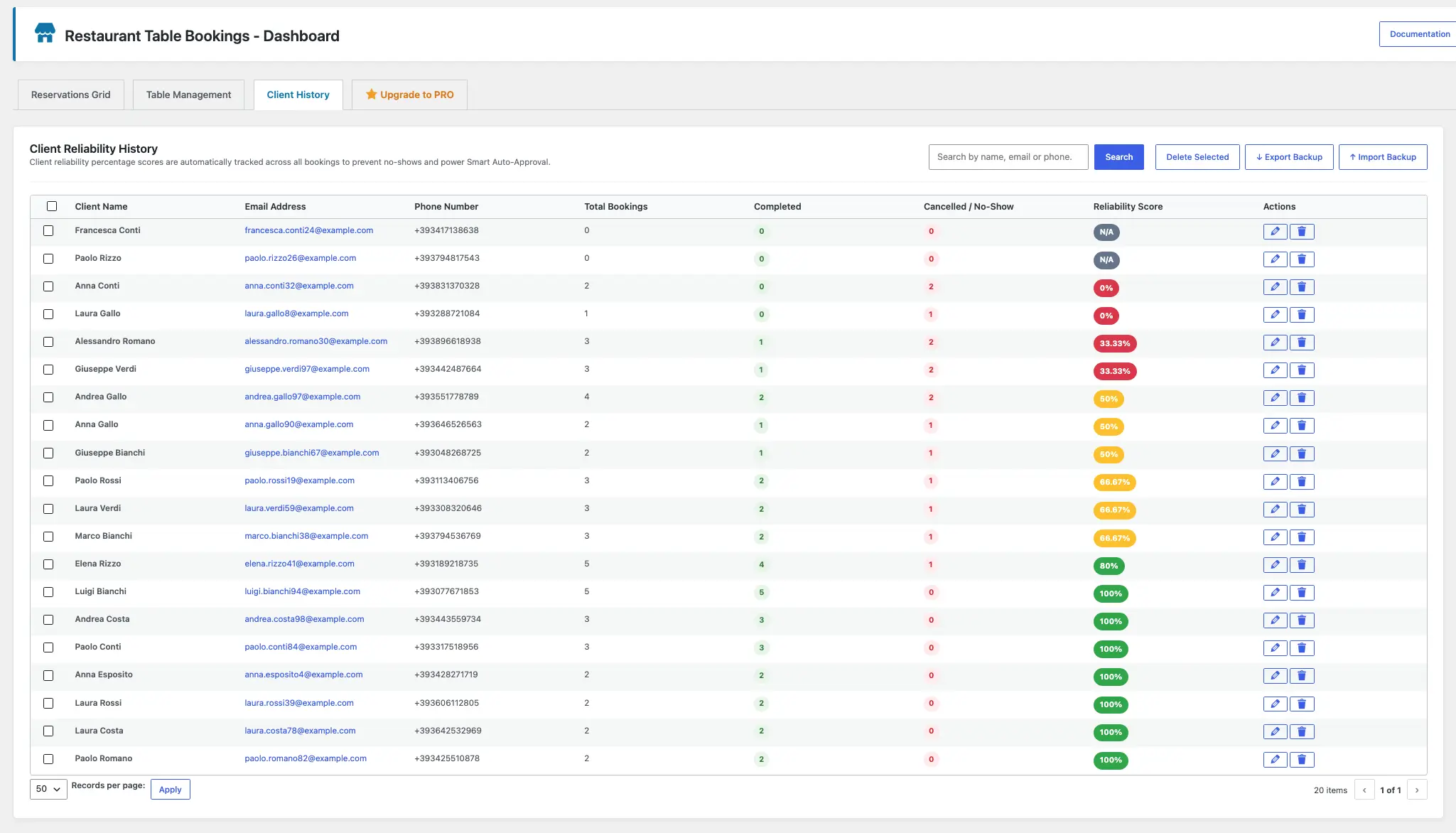
Client CRM directory & reliability score
Guest profile directory tracking past visits, total bookings, dining notes, and reliability index.
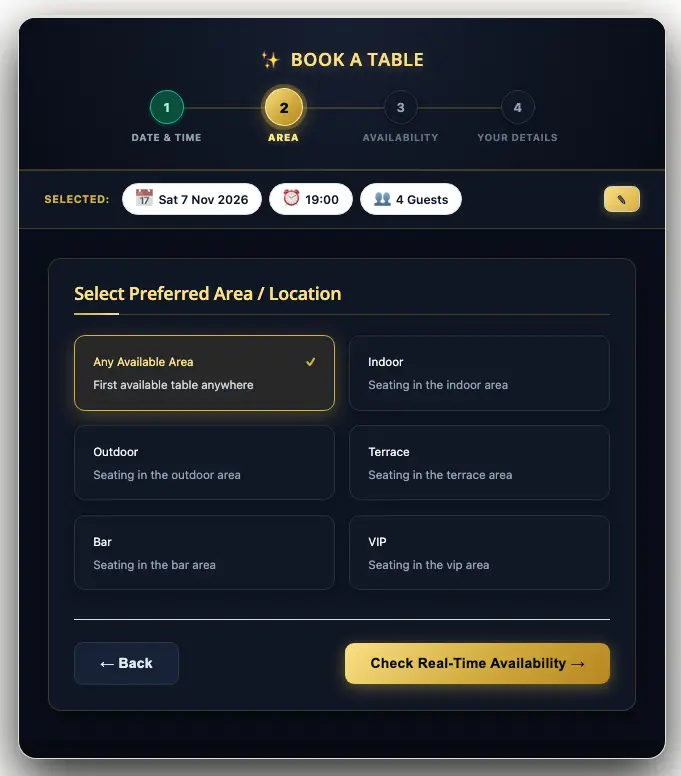
Dark Mode Luxe customer booking theme
Ultra-premium OLED obsidian black aesthetic with liquid gold buttons, optimized for fine dining.
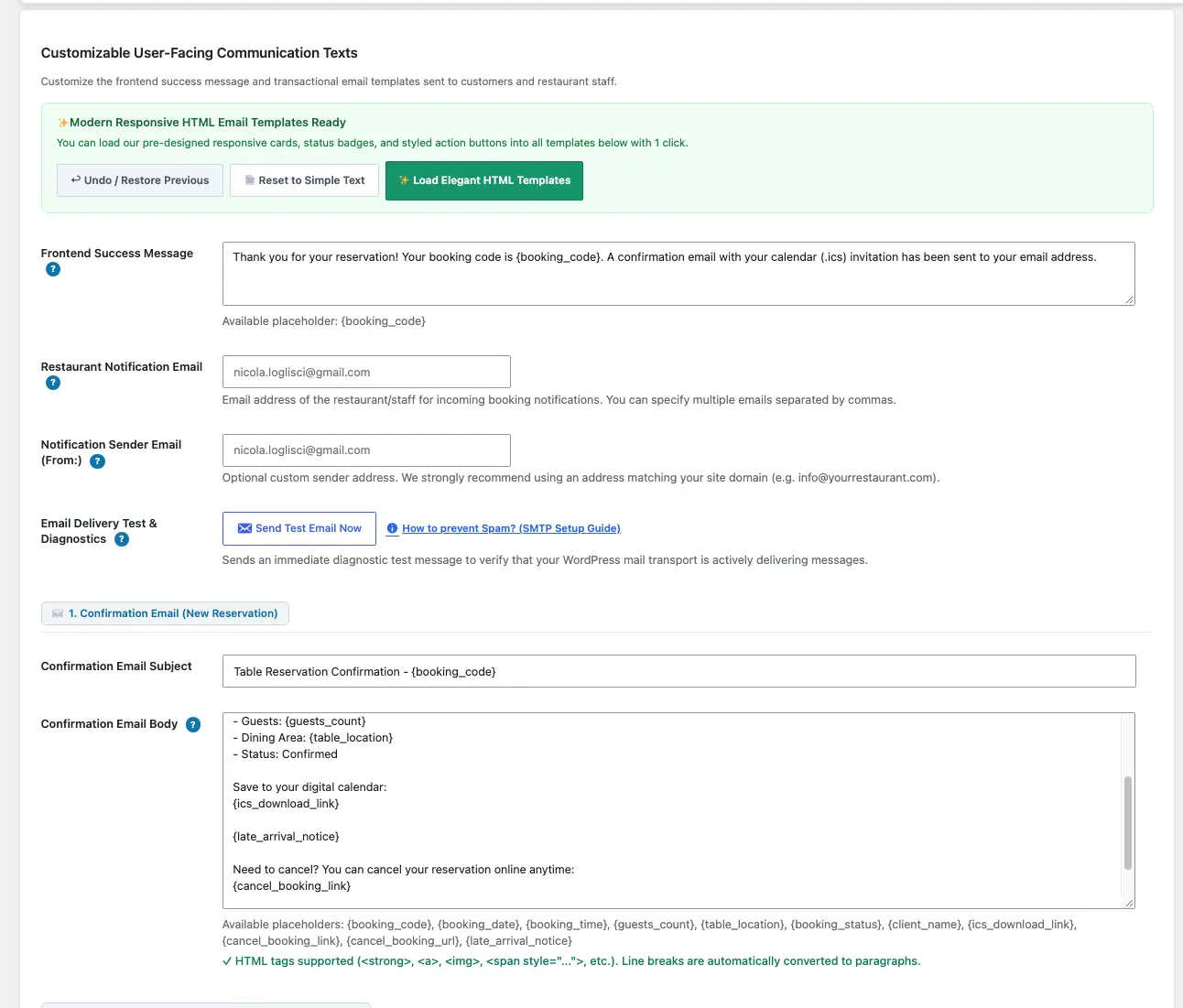
Customizable HTML email templates
Tailor email subjects and messages with dynamic tags, live preview modals, and 1-click restore.
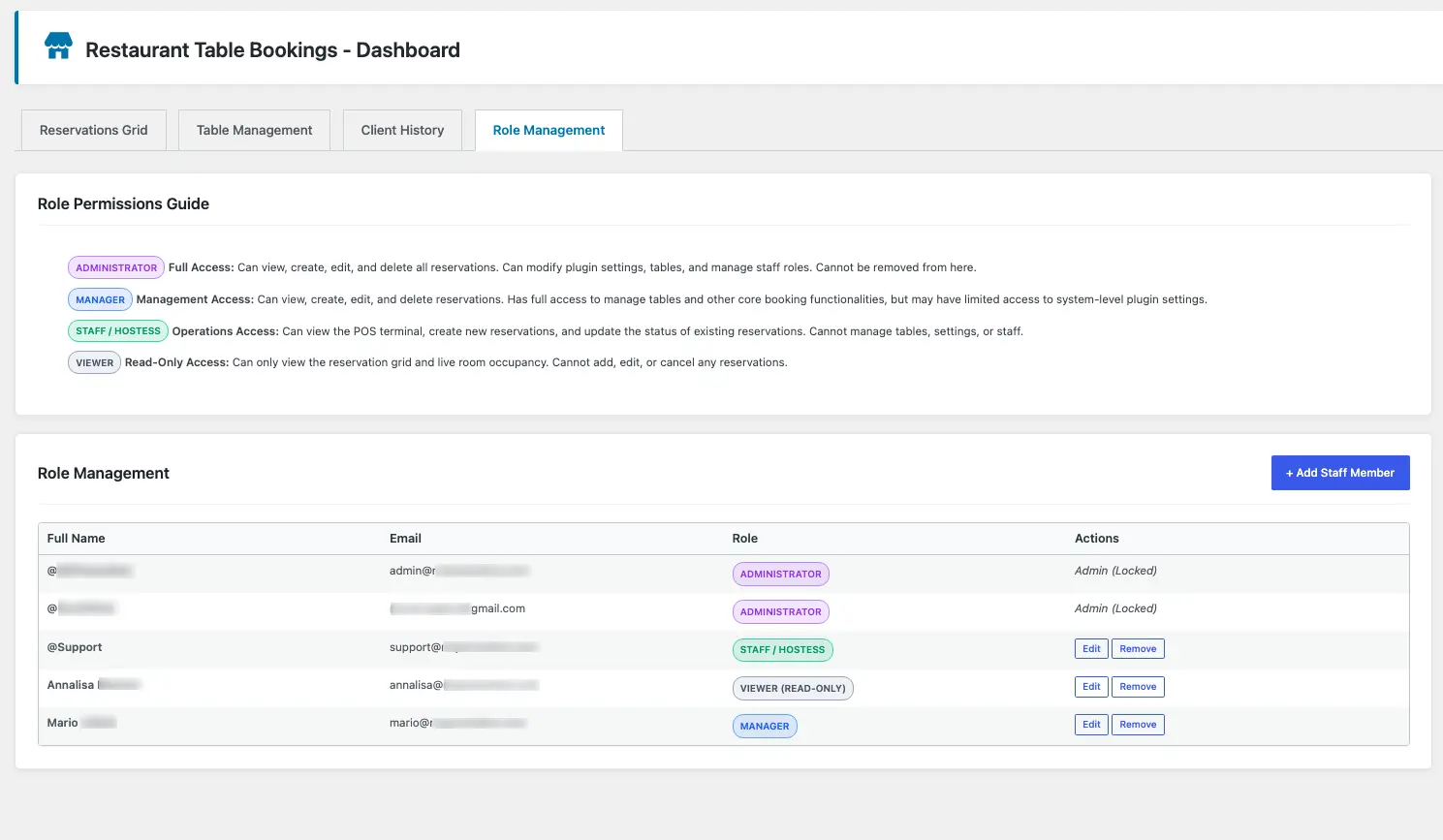
Dedicated front-of-house staff roles
Granular roles for Manager, Hostess/Waitstaff, and Kitchen Viewer without exposing global WordPress tools.
Comparison Free vs Pro
A comprehensive side-by-side comparison between the free core plugin and the professional operations suite.
| Features & Capabilities | Free Edition | PRO Edition |
|---|---|---|
| 1. Online Guest Reservation Experience (Frontend) | ||
Multi-step booking wizard (Shortcode [ln_restaurant_booking_form]) |
||
| Included frontend form themes | Modern Cards + Classic Bistro | All 4 themes (+ Dark Luxe & Sidebar Split) |
| Dark Mode Luxe theme (OLED obsidian & liquid gold) | ||
| Sidebar Split theme (2-column grid with persistent live summary) | ||
| International phone selector with country auto-detection | ||
| Real-time input verification warnings (RFC 5322 & ITU-T E.164) | ||
| Dietary & kitchen quick tags (Allergy, Gluten Free, Vegan, etc.) | ||
Highlighted bracket badges [ Tag ] in guest notes |
||
| Real-time table capacity validation & party limits | ||
| Flexible shifts & operating hours (Lunch / Dinner) | ||
| Past time slot blocking on current day | ||
| GDPR privacy consent enforcement | ||
| 2. Front-of-House & Floor Operations (Staff) | ||
| Classic WP-Admin reservations management table | ||
| Instant status auto-save with animated toast notifications | ||
| Pending reservation bubble counter in WordPress menu | ||
| Reservation status filters (All, Confirmed, Pending, No-Show, etc.) | ||
Fullscreen Touchscreen Staff POS Terminal (Shortcode [restopub_staff_terminal]) |
||
| 1-Tap Light / Dark OLED theme switcher | ||
| Live room occupancy map & real-time KPI capacity bar | ||
| 3-Second rapid walk-in and phone reservation insertion | ||
1-Tap quick phone call (tel:) from tablet POS for late guests |
||
| 3. Client CRM, Reliability Scoring & Anti No-Show | ||
| Integrated Client CRM directory with visit history and notes | ||
| Automated guest reliability score calculation | ||
| Loyal VIP guest badge (threshold-based) | ||
| Smart auto-approval automation engine for VIP patrons | ||
| Universal smartphone calendar sync (.ics for Apple / Google / Outlook) | ||
| Guest self-service cancellation portal with cryptographic HMAC token | ||
| Instant table inventory release upon guest self-cancellation | ||
| 4. Transactional Notifications & HTML Emails | ||
| Automated confirmation email with booking code & .ics download | ||
| Pending request guest email alert during manual review | ||
| Urgent staff email alert with 1-click dashboard approval link | ||
| Modification notices with updated .ics calendar invitations | ||
| Professional HTML email templates with 1-click undo/restore | ||
| Custom HTML email template editor with dynamic tags | ||
| 5. Staff Permissions & Multi-User Security | ||
| Standard WordPress Administrator and Editor integration | ||
| Dedicated restaurant staff roles (Manager, Waitstaff, Kitchen Viewer) | ||
| Restricted tablet interface with global admin menu protection | ||
| 6. Data Management, Backups & Updates | ||
| 1-Click demo data installer for instant 10-second setup | ||
| Complete 1-click JSON backup and restore for tables, CRM, and bookings | ||
| Automatic 1-click updates inside WordPress dashboard | Via WordPress.org | Via GitHub Releases & License |
| Zero-loss database guarantee between Free and PRO | ||
Choose your Pro license
Unlock the touchscreen Staff POS terminal, live room occupancy map, and smart auto-approval.
Restaurant Table Bookings PRO
The plugin is available in two license options:
license for 1 site - license for 5 sites
The 5-site license includes a favored rate with a 20% discount already applied.
10% launch discount with coupon:WELCOME10 (valid for both license tiers)
Includes a 14-day free trial
- Fullscreen touch Staff POS Terminal for counter tablets
- 1-Tap Light & Dark OLED glare-free theme switcher
- Live room occupancy floor map with real-time KPI bar
- Smart auto-approval automation engine for VIP guests
- Luxury form themes: Dark Mode Luxe and Sidebar Split
- Smartphone calendar sync (.ics for Apple and Google)
- Guest self-service cancellation with secure HMAC token link
- Granular staff roles for floor, cassa, and kitchen screens
- 1-Tap quick phone call (
tel:) from tablet POS - 1-Click JSON backup and restore for tables, CRM, and bookings
- 1-Click automatic updates and priority support for 1 year
Frequently asked questions (FAQ)
Everything you need to know about the plugin, hardware compatibility, and floor operations.
If I start with the Free plugin, will I lose data when upgrading to Pro?
Not at all. The Free and PRO editions share 100% of the exact same database structure (wp_pub_tables, wp_pub_clients, wp_pub_reservations). When you activate the PRO edition, you will instantly see all your configured tables, client CRM directories, and existing bookings without exporting or reconfiguring anything.
Does the plugin slow down my WordPress site loading speed?
No, it is built to be ultra-lightweight. The frontend booking wizard runs on pure Vanilla JavaScript (zero jQuery dependencies in the public form) and loads minified CSS, ensuring fast page load times and optimal Google Core Web Vitals scores.
Can I use the Staff POS Terminal on any tablet or counter screen?
Yes, it is 100% web-based. It runs flawlessly on iPads (Safari), Android tablets (Chrome, Firefox, Edge), touch laptops, and Windows counter POS screens. You can access it directly inside WordPress Admin or embed it on a password-protected staff page using shortcode [restopub_staff_terminal].
Can guests cancel their own reservations without calling the restaurant?
Yes, securely and automatically. Every confirmation and modification email includes a tamper-proof cryptographic HMAC token link. Clicking the link takes the guest to an authenticated review screen to confirm cancellation with 1 click. The table is instantly returned to available inventory, and staff receives an instant notification.
Is it compatible with page builders like Elementor, Divi, or Gutenberg?
Yes, full universal compatibility is guaranteed. Simply add the native Gutenberg Shortcode block or the Elementor, Divi, or Beaver Builder Shortcode widget and enter [ln_restaurant_booking_form].
How do the dedicated staff roles work in the Pro edition?
The PRO edition introduces 3 isolated roles: Restaurant Manager (full control over tables, shifts, and settings), Restaurant Staff (daily operational management and tablet POS access without exposure to global WordPress menus), and Restaurant Viewer (read-only monitoring, ideal for kitchen screens and floor runners).
Ready to take full control of your restaurant reservations?
Streamline front-of-house operations for your staff and offer your guests a frictionless table booking experience.