IntelliLink Craft PRO
Generate smart, automated internal links to rank higher on Google. The plugin scans your historic posts, suggests focus keywords using AI, and securely transforms text into links on the fly.
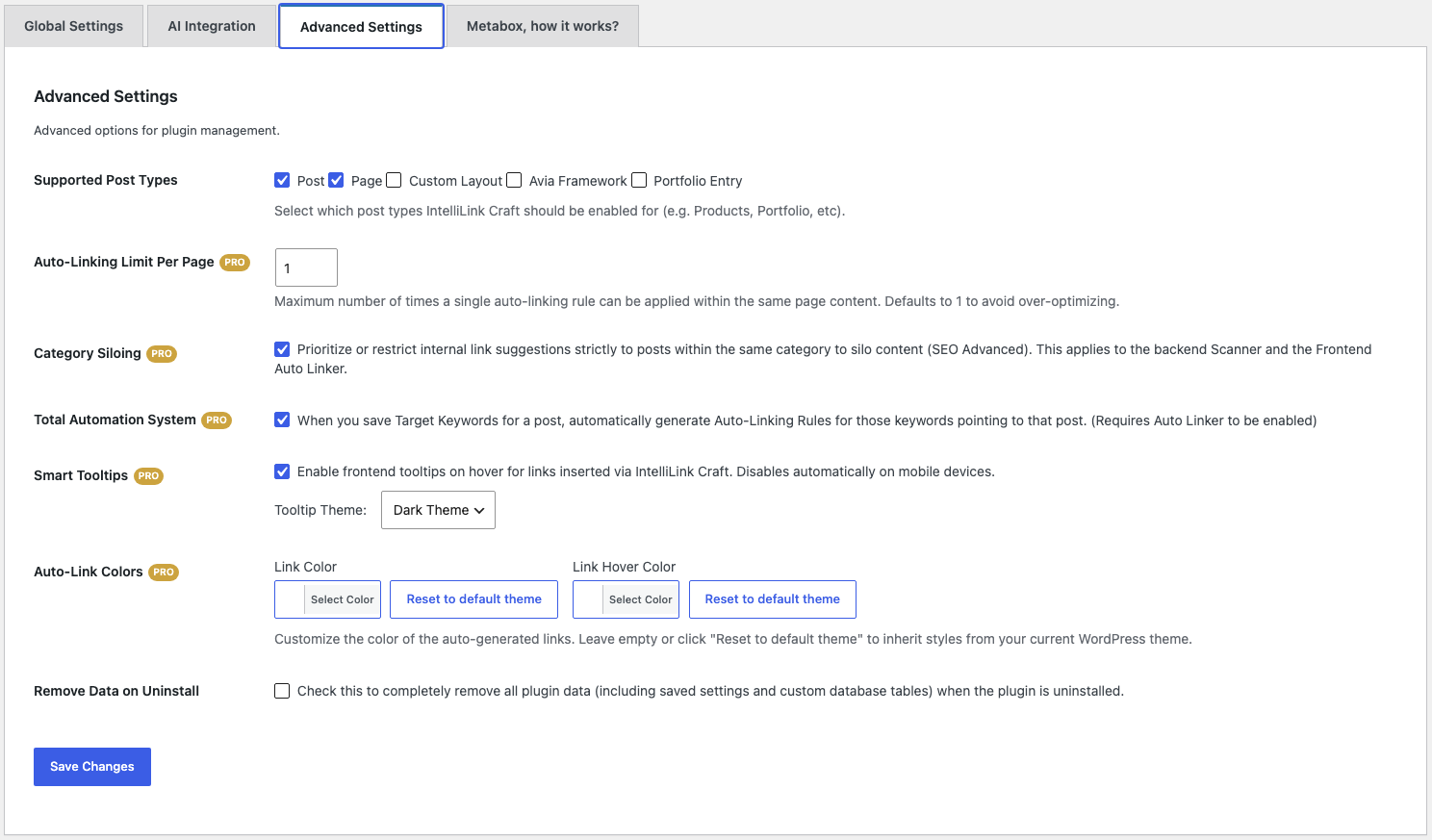
Core Features Included in Free Version
Manually optimize and monitor your site's internal link graph directly from the WordPress editor screen.
Target Keywords Manager
Easily define and save target focus keywords for each page or post directly in the editor sidebar, without interrupting your writing workflow.
Smart Content Scanner
Scan your current post editor content to detect exact-match mentions of keywords pointing to older pages, generating instant manual link opportunities.
Contextual Highlights
The scanner highlights the exact sentence containing the match inside your post, letting you verify its logic and natural reading flow before adding the link.
Multiple Occurrence Detection
Detect all appearances of a keyword inside your article with built-in SEO warnings to prevent over-linking and search engine penalties.
Frontend Auto Linker
Render rules on the fly as pages load. Zero database bloating; links are safely injected inside the browser render dynamically.
Wikipedia-Style Tooltips
Increase click-through rates. Beautiful hover tooltips display target post excerpts and featured images right inside the text flow.
Category Siloing
Focus your topic authority. Enforce strict siloing by limiting automatic links to pages belonging to the same category.
Advanced Rules Manager
Control a massive rules database. Simple admin dashboard lets you filter, search, paginate, and bulk delete rules.
Link Health & Broken Links
Keep track of inbound/outbound links for each page and detect broken links (404s) to maintain a healthy internal site architecture.
Auto-insert links and leverage AI optimization
Stop doing keyword research and link insertions by hand. With IntelliLink Craft PRO, your internal linking is powered by state-of-the-art AI engines and global rules.
When you define focus keywords for a new post, the Total Automation system instantly writes a global ruleset. Your entire archive of pre-existing posts will automatically link to the new page, driving immediate Google crawl actions and indexation.
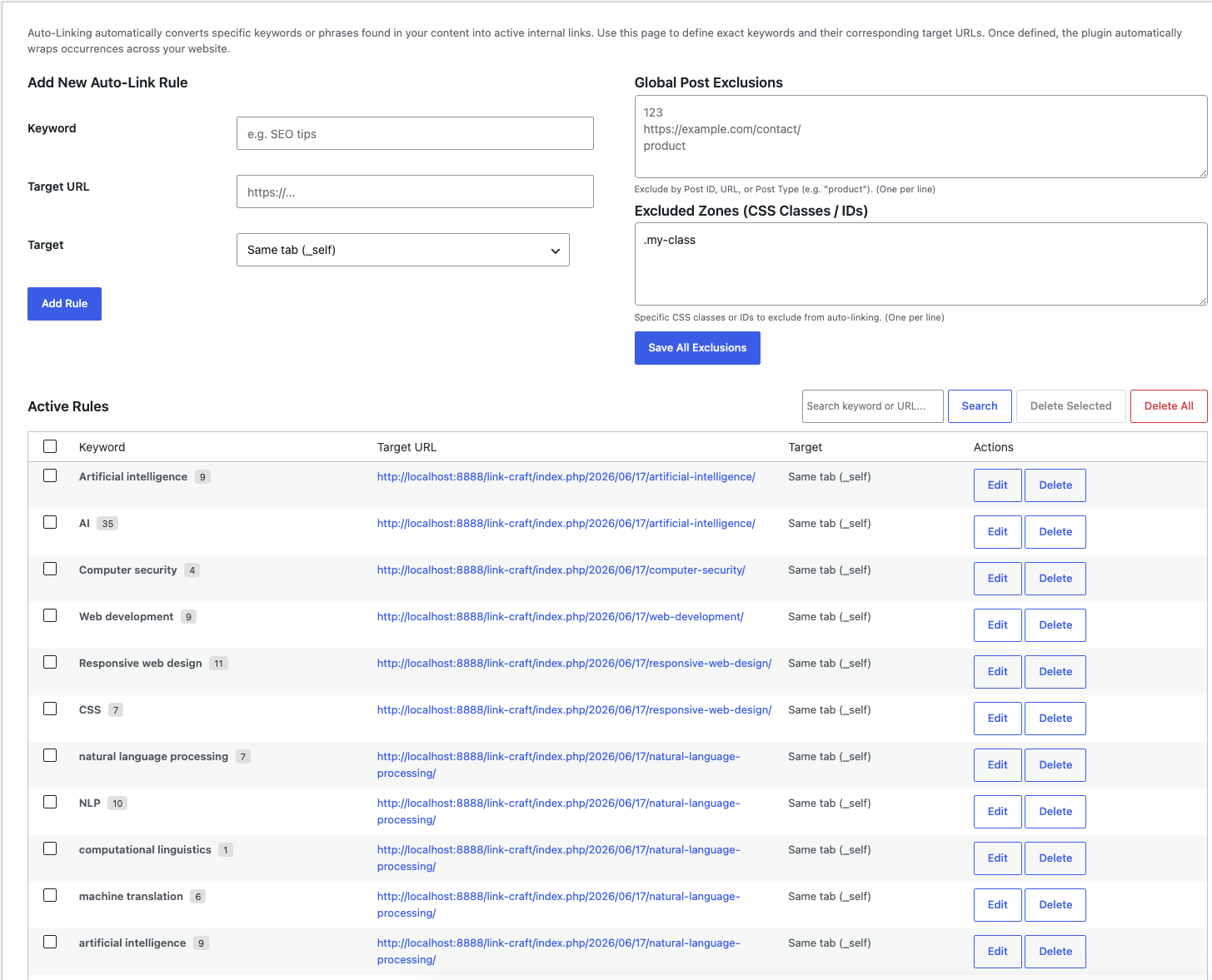
Exclusive PRO Capabilities
Much more than a basic linker: a comprehensive marketing and SEO funnel architecture to guide search engine crawls.
AI Suggestion with Premium APIs
Generate highly-relevant keywords with a click via secure API connections to OpenAI, Google Gemini, and Anthropic Claude.
Total Automation System
Automatically generate global auto-linking rules whenever you define a target keyword for an article. Zero manual work required!
Editor Auto-Insert Links
Inject suggested links permanently into Gutenberg or Classic Editor content blocks with a single click, bypassing copy-pasting.
Global Link Opportunities
A powerful dashboard tool that scans your entire website archive against target keywords to find and connect historic missed links.
Global Exclusions & CSS Bypass
Exclude specific pages, URLs, or Custom Post Types. Protect sliders or tables by bypassing custom CSS classes or IDs.
Orphan Pages & Deep Auditing
Clean up your SEO health. Detect orphan pages with zero inbound links and analyze deeper internal architecture stats.
Centralized control and massive updates
Tailored for bloggers, SEO agencies, and developers to take absolute command of their WordPress link architecture.
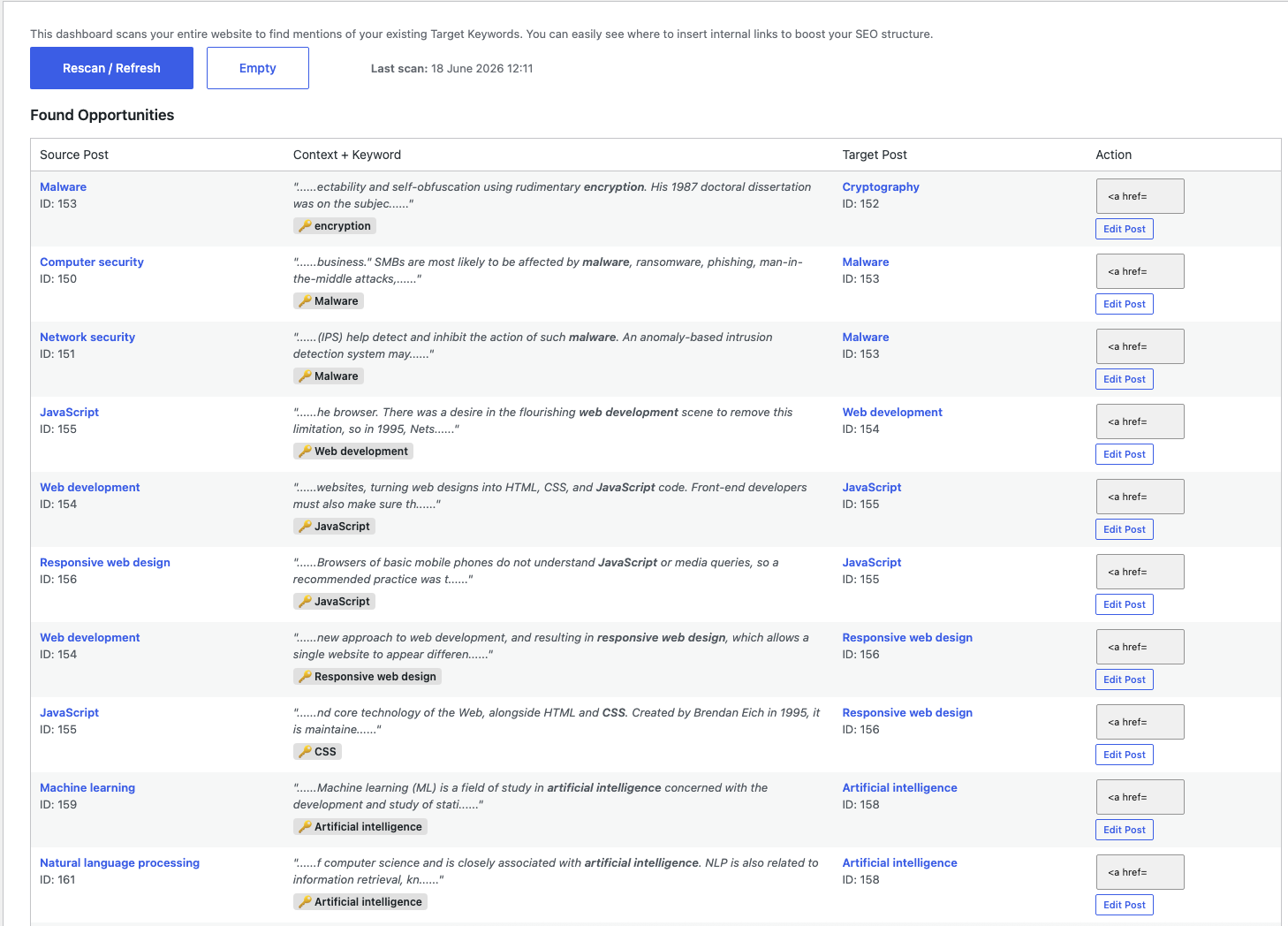
Global Link Opportunities
Scan your entire database for historic mentions of focus keywords. Convert plain text occurrences into rich internal links with a single click.
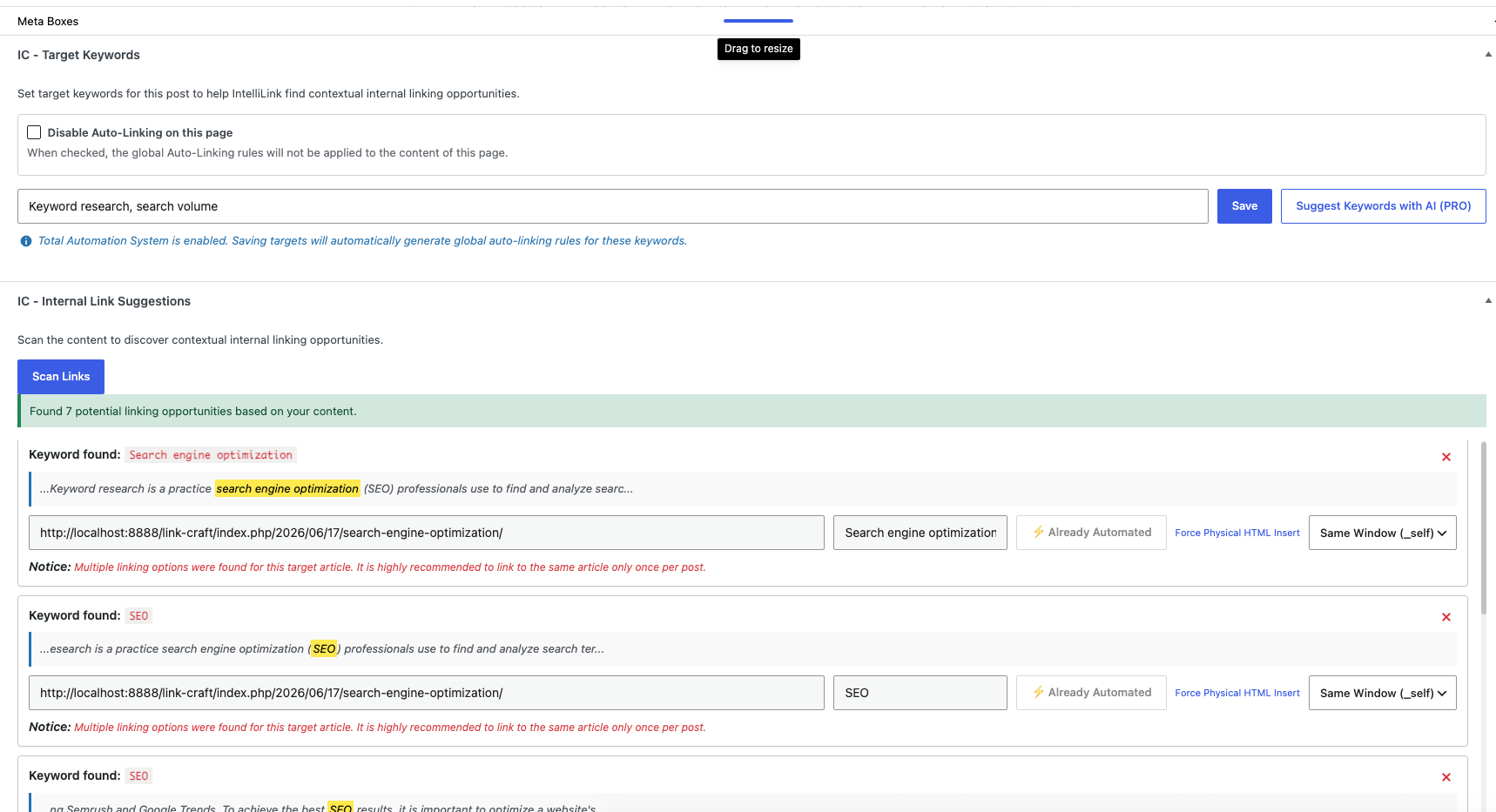
Seamless Gutenberg Sidebar
A complete metabox on the article editor page allows you to generate focus keywords, run contextual content checks, and inject links without leaving your editor screen.
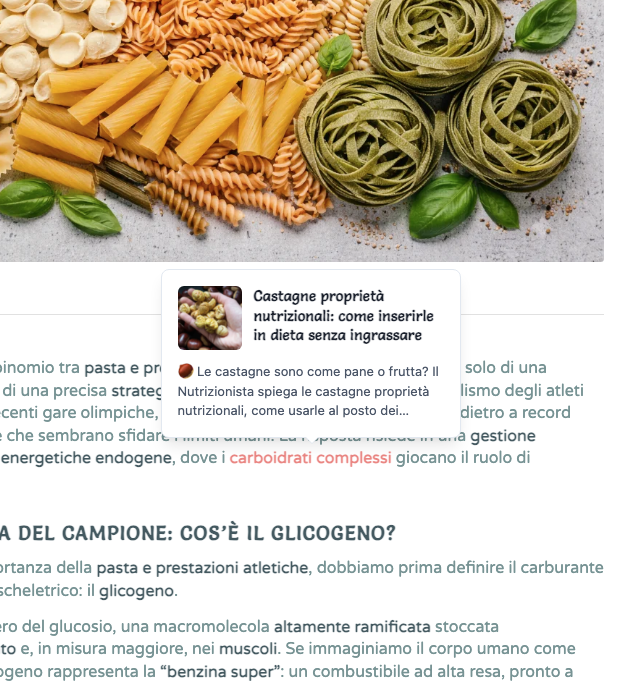
Wikipedia-style Smart Tooltips
Engage readers and lower bounce rates by displaying post summaries alongside featured images directly inside hover tooltips on the frontend.
Free vs PRO Comparison
Select the automation tier that fits your content and search engine optimization strategy.
| Features | FREE / CORE | PRO VERSION |
|---|---|---|
| Target Keywords Manager | ✔ | ✔ |
| Smart Content Scanner | ✔ | ✔ |
| Contextual Snippet Highlight | ✔ | ✔ |
| Multiple Occurrence Detection | ✔ | ✔ |
| Custom Post Types Support | ✔ | ✔ |
| Basic Link Health Data & Broken Link Scanner | ✔ | ✔ |
| Frontend Auto Linker System | ✔ | ✔ |
| Smart Wikipedia-Style Tooltips | ✔ | ✔ |
| Category Siloing (Advanced Silos) | ✔ | ✔ |
| Advanced Rule Management | ✔ | ✔ |
| Basic AI Keyword Suggestion | ✔ | ✔ |
| Exclusive PRO Features | ||
| AI Suggestion with Premium APIs (OpenAI, Gemini, Claude) | ✘ | ✔ |
| Total Automation System | ✘ | ✔ |
| Editor Auto-Insert Links The Auto-Insert (PRO) feature is optimized for the Classic Editor and standard Gutenberg blocks. If you are using complex page builders (like Enfold, Elementor, Divi, etc.), we recommend using the "Copy HTML" button and manually pasting the link into the specific text module. | ✘ | ✔ |
| Global Link Opportunities Dashboard | ✘ | ✔ |
| Global Post Exclusions & Excluded Zones | ✘ | ✔ |
| License & Support | ||
| Free core updates via WP.org repository | ✔ | ✘ |
| Dedicated one-click updates inside WordPress | ✘ | ✔ |
| Priority technical support | ✘ | ✔ |
Choose your pro license
Unlock complete access to advanced automation and AI internal link engines.
IntelliLink Craft PRO
The plugin is available in two licensing options:
license for 1 site - license for 5 sites
The 5 sites license will feature a special price with a 20% discount already applied.
Special 10% discount coupon:WELCOME10 (valid for both licenses)
Includes a 14-day free trial
- Total Automation logic on save
- AI keyword suggestions (OpenAI, Claude, Gemini)
- One-click editor link auto-insertion
- Website-wide missed opportunities scan
- Post ID, URL, and CSS zone exclusions
- Orphan page detection
- Automatic updates and developer support
Frequently asked questions (FAQ)
Everything you need to know about auto-linking, smart tooltips, and Category Siloing features.
What is Category Siloing?
Category Siloing is an SEO architecture tactic that groups relevant articles together. Enforcing this silo constraint prevents the Auto-Linker from generating cross-category links, keeping PageRank focused on specific topic clusters.
Will the Auto-Linker slow down page load times?
No. Our frontend auto-linker handles parsing in the background during page generation in PHP, resulting in zero extra database requests and keeping load times extremely fast.
Can I exclude words or code sections from auto-linking?
Yes. You can configure global exclusions for focus words or target pages, and input specific CSS classes or IDs to bypass (preventing links inside sliders, tables, or buttons).
How does AI keyword generation work?
The plugin securely sends your post content block to OpenAI, Gemini, or Claude using your bring-your-own API keys. The selected AI analyzes your context and automatically recommends the 5 most effective focus keywords.
Do I need to install the free version first?
Yes. IntelliLink Craft PRO is built as an add-on. The core free version must be active on your WordPress site for the PRO features to run.
What is the Total Automation System?
The Total Automation System completely automates internal link creation. When you save a target keyword for a post, the plugin instantly creates a global auto-linking rule for that keyword. Furthermore, if you configure an AI Provider, it will silently generate synonyms in the background.
Ready to revolutionize your internal link architecture?
Supercharge your site crawling speed. Get notified immediately when IntelliLink Craft PRO goes live.